The AI models
Every model runs on your own Mac. Nothing is uploaded, there is no account and no usage limit. Six are downloaded on demand — they are large, and most people do not use all of them.
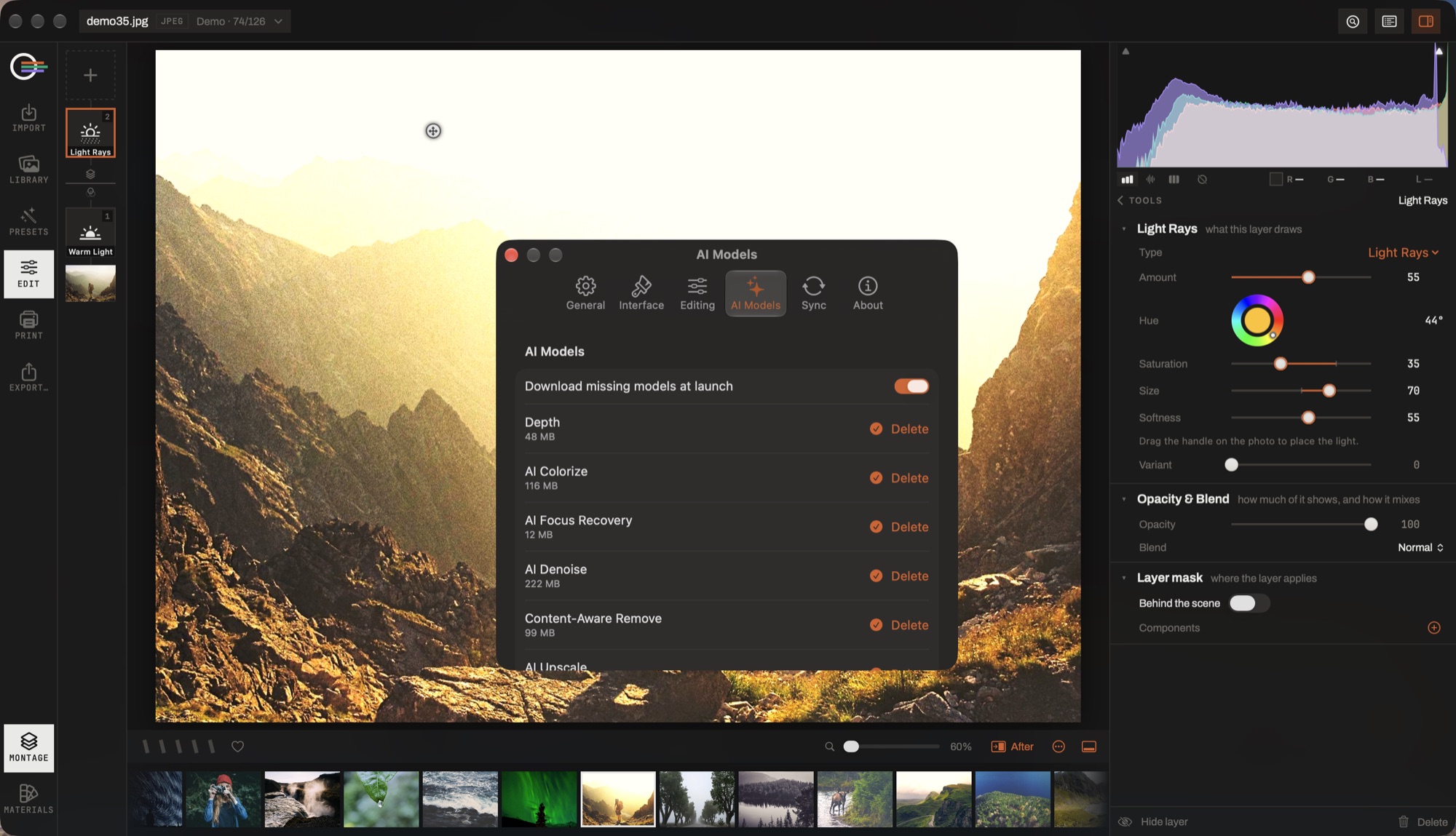
- Download missing models at launch. Whether the app fetches what is missing ahead of use — asked once per installation, with the byte count, and only over an unmetered network.
- The size beside each name. What the download costs, and what deleting it gives back.
- Delete. Removes the file, not the tool. Open the tool again and it offers to fetch it back.
- What is not in the list. Subject, people and skin selection ride Apple's own Vision, and the object picker's model is bundled — none of them is a download.
- Nothing here is a subscription. There is no account, no usage limit and no upload; a model is a file on your disk.
Downloading and deleting
Settings → AI Models lists every model with its size and its state, and fetches or deletes each one individually. The app offers to fetch the missing ones once, over an unmetered connection, and Download missing models at launch keeps a new machine in step.
A tool whose model is not there says so rather than leaving a slider that moves and changes nothing. Deleting a model hides the tool it powers and changes nothing else — your edits are unaffected, and the rasters already computed stay in the cache.
They are kept in Application Support and excluded from your backups, because they can always be fetched again.
The six models
- AI Denoise 222 MB
- Runs once over the photograph at native resolution, tile by tile, and the result blends in as an ordinary slider. It is checked as it goes: a tile the network has ruined, or a patch of texture it invented that was never in the picture, is handed back unchanged rather than printed.
- Content-Aware Remove 99 MB
- Fills what a retouch spot covers from what is around it — wires, a bin, a passer-by, a scratch on a scan. The spot stays editable afterwards.
- AI Colorize 116 MB
- Colour for a monochrome photograph. Only the colour comes from the model; the original's own luminance is put back, so no detail is lost to the pass.
- Depth 48 MB
- One pass that estimates how far away everything is. It drives the Depth tool, depth masks, and the sky detector.
- AI Upscale 33 MB
- 2× super-resolution, offered on export and in the Library's Upscale action.
- AI Focus Recovery 12 MB
- Recovers out-of-focus blur — the degradation a sharpening slider structurally cannot touch.
Honest ceiling on Focus Recovery: the recovery happens near the model's own scale, so on very large files it reads softer at 100% than it does fitted. It turns an illegible sign into a readable one; it does not make a missed focus into a hit.
What needs no download
Three capabilities ride Apple's own frameworks and are always there:
- Subject, people and skin masks, and the face landmarks the Portrait tool works on.
- The scene labels that make searching for what is in a picture work.
- The quality analysis behind the culling scores.
Enhance AI is analysis rather than a network: it reads your photograph and writes ordinary slider values, which is why it can travel in a preset and still land differently on every picture.
Where the AI shows up
- Detail
- AI Denoise and AI Focus Recovery, beside the ordinary sharpening and noise reduction.
- Retouch
- The Remove mode.
- Black & White
- AI Colorize, going the other way.
- Depth
- Bokeh, relight, atmosphere and sun, off the depth map.
- Sky
- The selection, which is found through the depth map.
- Masking
- The subject, people, skin, sky, object and depth selections.
- Export
- Super resolution 2×, and remove background.
A model's licence, where it is redistributable, is in Help → Open Source Licenses with the plates of any installed sky pack.