Export
One sheet with everything in it. Every export renders through the same graph as the loupe, at full resolution — what you saw is what is written.
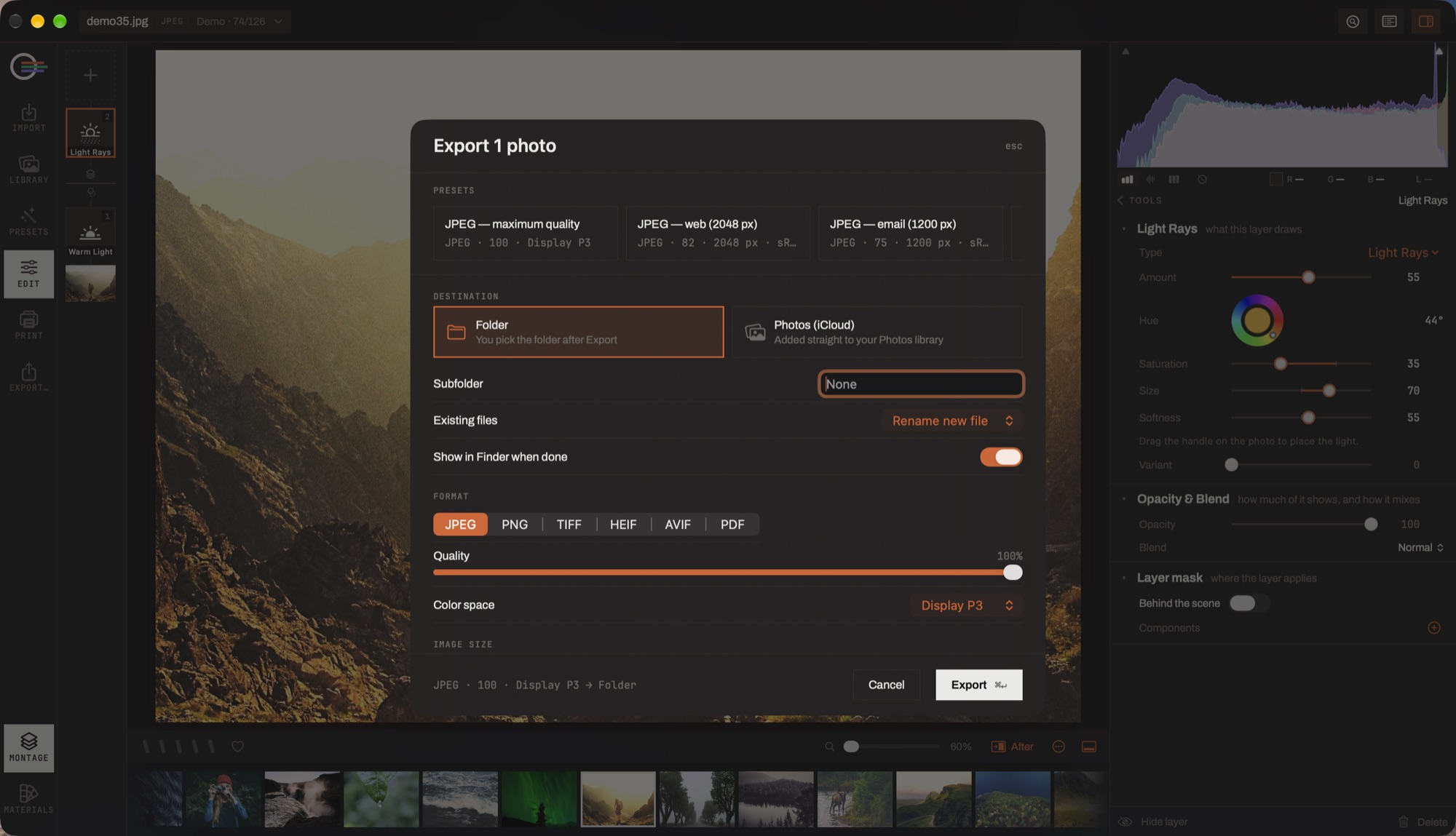
- Presets. The whole sheet, saved and named. Three ship with the app.
- Destination. A folder you pick after pressing Export, or straight into Photos — with an optional subfolder, and what to do when the name is already taken.
- Format. JPEG, PNG, TIFF, HEIF, AVIF or PDF, with quality and colour space under it. The alpha formats gain a remove-background row; JPEG does not offer one.
- Image size. Below the fold here: the long edge, a percentage, or the native size — and the 2× upscale, which is the one place it is offered.
- The summary line. What is about to be written, in words, before you press the button.
The sheet
- Export the selection
- ⇧⌘E
- Export with the previous settings, asking nothing
- ⌥⇧⌘E
Format and size
- Format
- JPEG, PNG, TIFF or HEIF, with quality, bit depth and colour space.
- Image size
- Original, or bounded by a long edge, a width or a height, in pixels.
- Super resolution 2×
- Runs the upscaler over the render instead of resampling it. It needs the model; asking for it without one is refused rather than quietly written at 1×.
- Output sharpening
- For screen, glossy paper or matte paper, at three amounts. Paper eats sharpness that a screen does not.
- Remove background (AI)
- Keeps the detected subject and makes everything else transparent. Offered only on formats that have an alpha channel — a stale setting on a JPEG is ignored, not silently applied.
Naming and metadata
- File naming
- Original name · name + sequence · date + name · custom text · custom text + sequence, with a start number and a live example so you can see what you will get.
- Metadata
- All, copyright only, or none — and, separately, a switch that strips the location.
Destination and presets
- Folder
- You pick it after pressing Export, and the last one is remembered.
- Photos (iCloud)
- Added straight to your Photos library.
- Existing files
- Skip, rename the new file, or overwrite. Chosen in advance rather than asked per file.
- Show in Finder when done
- Reveals what was written.
Four presets ship — JPEG web 2048 px, JPEG email 1200 px, JPEG print, TIFF 16-bit archive — and any arrangement of the sheet can be saved as one of your own.