Search & filters
Two ways to narrow a catalog, and they compose: a search box that reads names, keywords and what is in the picture, and a filter bar that cuts by verdict, by camera setting and by place.
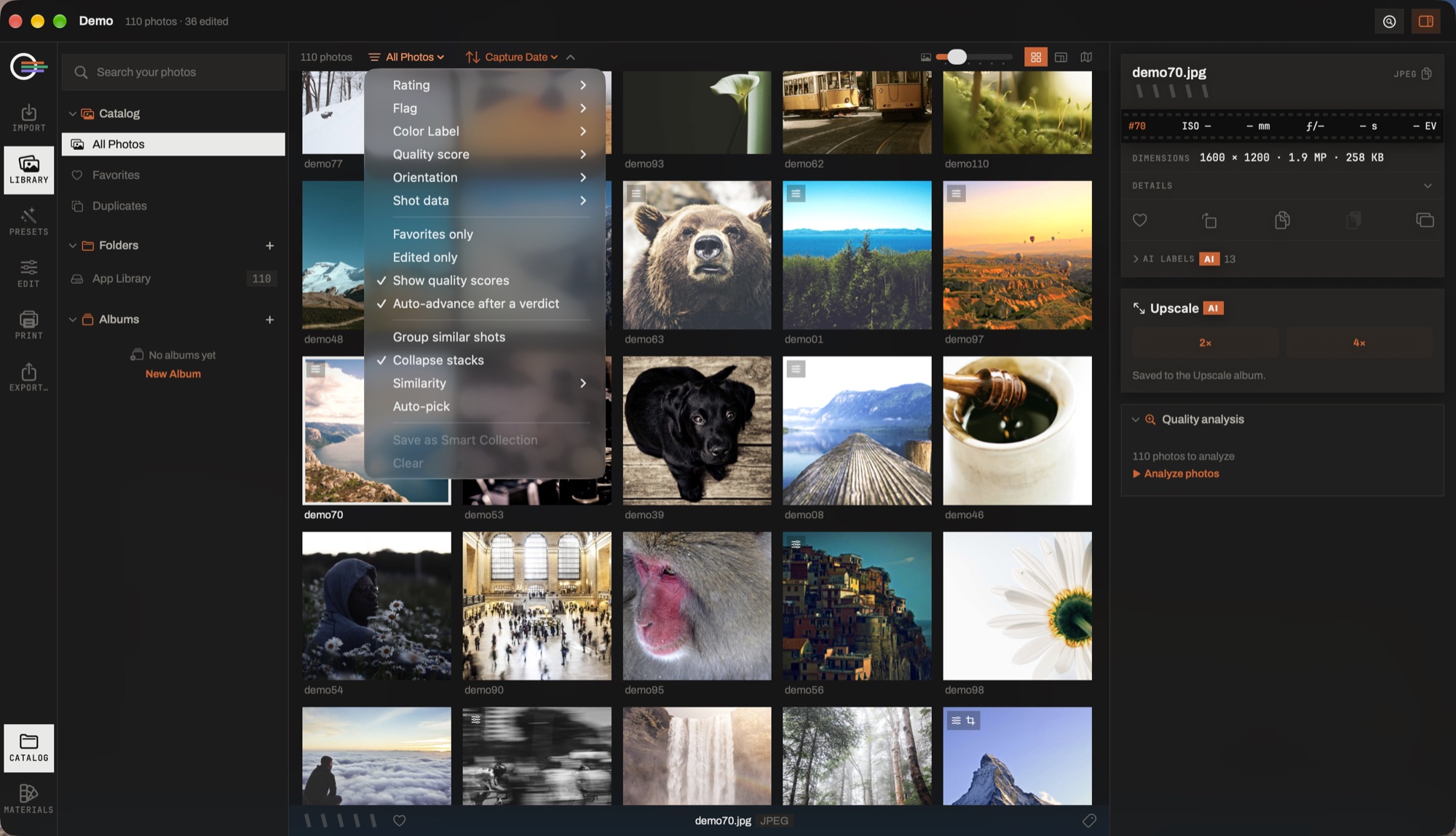
- The search field. File names, keywords, camera and lens — and what the scene index found, so sunset finds sunsets in files called DSC_0148.
- Rating · Flag · Color Label. The verdicts you gave, each with its own submenu.
- Quality score · Orientation · Shot data. The measurable ones: what the analysis read, the shape of the frame, and ISO, aperture, focal length and shutter — offered as bands, phrased the way each is spoken.
- Favorites only · Edited only. Two switches that compose with everything above them.
- Group similar shots · Auto-pick. Collapse the near-identical frames into stacks, and flag the keeper in each.
- Save as Smart Collection. The whole set of filters, kept as a row in the sidebar that re-runs itself every time you click it.
Searching ⌘F
The search field reads four things at once: the filename, your own tags, the camera and the lens — and, for words the app knows, the scene index: what the classifier found in the picture. Type sunset and classified sunsets come back beside anything named that way.
Several words narrow rather than widen: each has to match something, though not necessarily the same thing. The AI labels for the focused photograph are listed in the information column, folded until you ask, so you can see what vocabulary it has.
The filter bar
Everything here composes with the search and with the scope you are in, and all of it clears together.
- Stars
- A minimum rating — three stars and up, and so on.
- Favorites
- Only what you have hearted.
- Flags
- Picks, rejects, or the unflagged.
- Colour labels
- Red, yellow, green, blue — whatever you use them for.
- Edited
- Three states rather than a toggle: any, edited, untouched. "What is left to do" is a question worth asking directly.
- Area on the map
- The window the map is showing, as an ordinary filter — set from the map and cleared from here.
The measurable properties
Beside the verdicts sit the facts of the shot. Each is offered as bands rather than a pair of number fields, phrased the way the quantity is spoken — nobody types "ISO between 1600 and 12800" into a menu, and f/2.8 being a smaller number than f/11 is exactly what a bare range control gets wrong.
- ISO
- 400 and under · 400–1600 · 1600 and over · 6400 and over.
- Aperture
- f/2.8 and wider · f/4–f/8 · f/11 and narrower.
- Focal length
- Wide (under 35 mm) · normal (35–85 mm) · tele (85 mm and up).
- Shutter
- 1/500 and faster · 1/60 and slower · 1 s and longer.
- Sharpness
- Very sharp · sharp · soft, to find the misses. It reads the quality analysis, so only analyzed photographs can match.
- Orientation
- Landscape, portrait or square. Square is a band rather than an exact ratio: a hand-cropped square lands a pixel or two off constantly.
A photograph with no value for a field satisfies no band — a file with no EXIF is not "ISO 0". And selecting all three orientations is not a filter, so it clears itself.
Smart collections
Any filter you have built can be saved as a smart collection: a named entry in the catalog column that stays live as the catalog grows. It stores the question, not the answer, so a smart collection for "five stars, this year, untouched" is right tomorrow as well.
They can be renamed and deleted from the column, and deleting one never touches a photograph — it is a saved search and nothing else.