Culling & comparing
Three hundred frames from one afternoon is the problem the Library was built around. The quality analysis measures them, stacks group the near-identical ones, and the compare view settles the last call by eye.
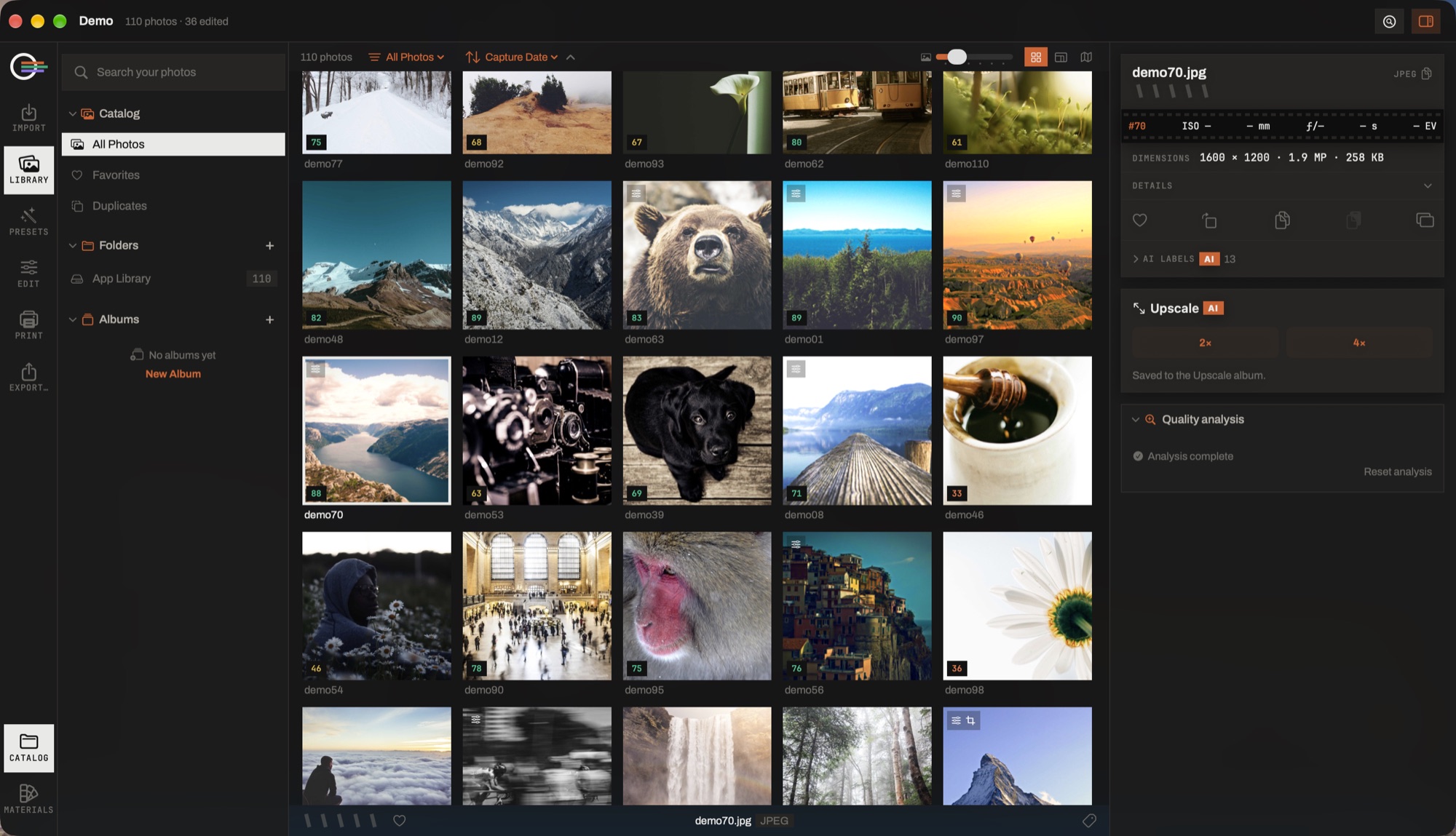
- The score. One number out of 100 in the corner of the tile, coloured by band — what the analysis made of exposure, focus, faces and duplicates.
- The quality analysis panel. The one background pass that waits to be asked, because it is the most expensive thing the app does. It can be paused, and it says how much is left.
- Two passes, reported apart. The first reads the previews — exposure, faces, duplicates; the second reads the originals for focus. They cost an order of magnitude apart, so one bar across both would mean nothing.
- Reset analysis. Throws the readings away. It does not quietly start a new pass.
- The scope menu. Quality score is a filter like any other: cut at 60 and see what is left, or group the near-identical shots and let auto-pick flag the keeper.
The analysis
It runs in two passes, reported separately because they cost an order of magnitude apart: a quick one over the previews — exposure, contrast, noise, faces, eyes, duplicates — and a deep one that opens the originals to measure focus.
It starts when you ask it to, from the Quality analysis panel in the Library inspector. It can be paused and resumed without losing its place, and it says how many photographs are left in each pass. A hollow score is provisional: the focus pass has not reached that photograph yet.
It waits to be asked because it is the most expensive thing the app does, and because it competes with the previews you are actually looking at. Start it when you go for coffee, not when you land a card.
What the score means
A number out of 100, and — this is the part that matters — Why this score, which lists what each signal measured and how much of the verdict it carried, with the biggest drop named.
- Exposure
- Blown highlights or crushed shadows.
- Contrast
- Flat — little tonal range.
- Sharpness
- Blurred or out of focus, measured on the sharpest part of the frame rather than its average: a portrait at f/1.4 against bokeh is not a miss, and a whole-frame reading calls it one.
- Face sharpness
- The faces themselves, each weighted by how much of the frame it occupies.
- Eyes open
- Someone's eyes are closed or half shut.
- Noise
- Grain or a high ISO.
- Aesthetics
- Composition and colour, as far as a model can judge them.
Two things are reported and deliberately not scored: whether the image is a screenshot or a document, and Vision's rating of a face capture — that one is only comparable between shots of the same person, so it is used to pick the best frame of a stack rather than to judge a photograph on its own.
Stacks of similar shots
Group similar shots collapses runs of near-identical frames into one tile. Two controls decide what counts:
- Similarity
- Loose · balanced · strict. Measured on what the frames look like, not on when they were taken.
- Time between shots
- How long a gap still counts as the same burst, up to any gap at all.
A stack expands, ungroups, and lets you choose which frame is the cover. Selecting a stack selects every frame in it, so a rating or a flag applies to the whole run.
Auto-pick
One pass over what the analysis found. It says what it is about to do before it does it, and it can be undone until you quit.
- Flag the best shot of each stack as a pick — the winner is chosen on the ranking score, which weighs the face capture quality where there is a face.
- Flag the other shots in each stack as rejects.
- Reject photographs scoring below a threshold you set.
By default it leaves alone anything you flagged yourself; a switch lets it overrule you, off until you turn it on. Photographs it has not analyzed are skipped and counted, rather than judged on nothing.
Compare
C puts the selected frames side by side, with zoom and pan synchronized so the same detail is under the eye in every pane.
- Every pane at 100% on its own subject's face
- F
- Paint what is in focus, on the same scale in every pane
- S
- Fit · 100%
- Fit100%
F is matched magnification with parted centres — which is what makes two portraits comparable at all. S paints the sharp regions on an absolute scale, so a comprehensively soft frame comes back nearly bare instead of glowing at its least-blurred corner; scaling each frame against itself makes a pretty overlay that answers the comparison backwards.
Keep this one picks the frame you are looking at and rejects the others being compared. Removing a photograph from the comparison leaves the photograph untouched.