Panorama, HDR, focus stack
Three ways to make a new photograph out of several frames, and one to make a bigger one out of a single frame. All of them leave the sources untouched.
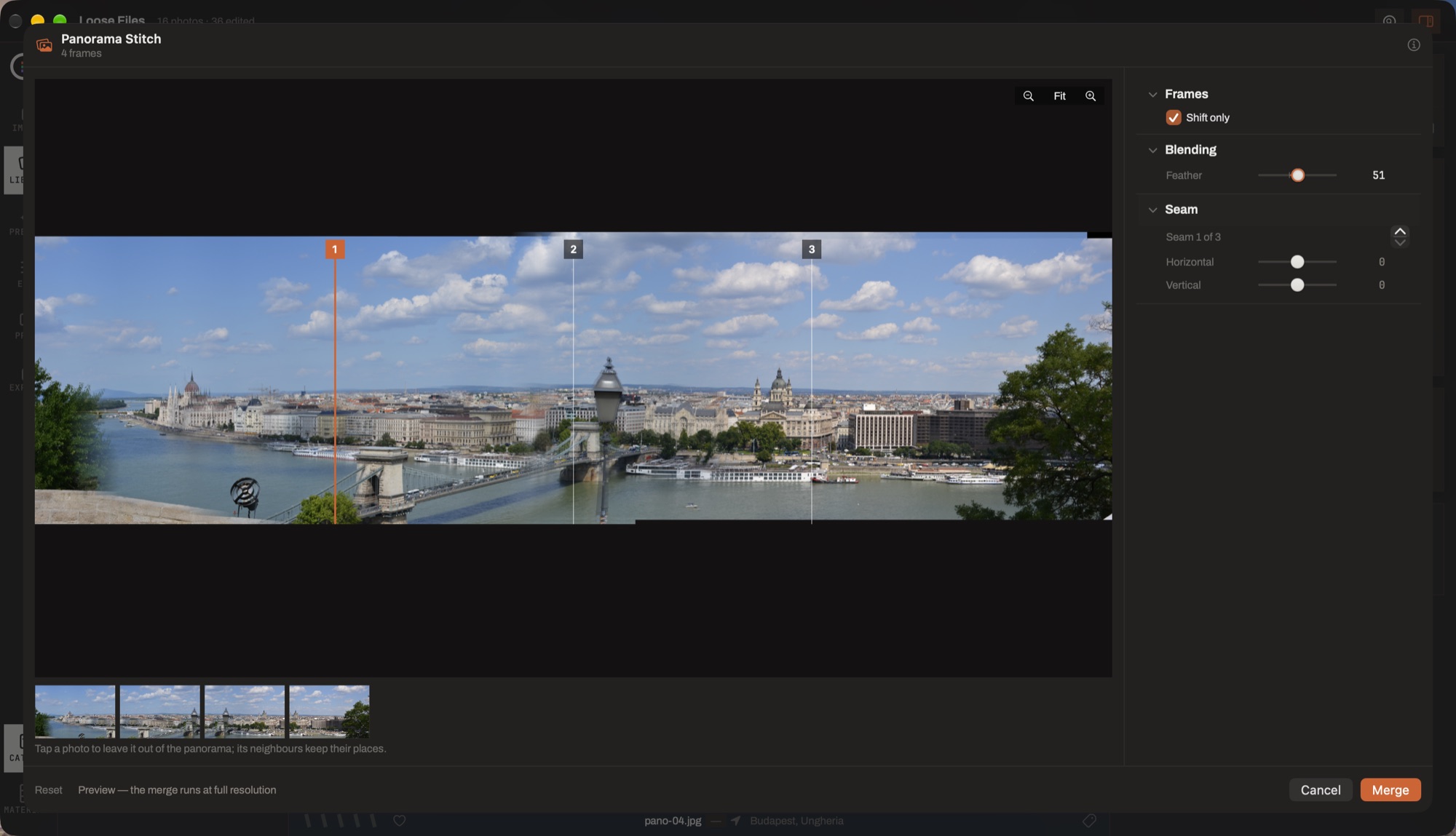
- The preview. The stitch at working scale — the same alignment the full-resolution merge will use, so what you tune here is what you get.
- The seam handles. One per join, numbered. Drag one and the frame after it moves, with everything past it, so the earlier seams keep.
- Frames · Blending · Seam. Translation-only placement for when the fit is what bends the panorama, how wide the blend is — 0 shows the seam as a hard line, which is how you judge alignment — and the fine trim on the selected seam.
- The frame strip. Tap a photograph to leave it out of the panorama; its neighbours keep their places, because it still holds the chain together.
- Merge. Writes a new photograph into the Merge album, at full resolution, from the originals.
How a merge works
Select the frames, choose Merge Photos, and say what they are. The result is a new photograph, catalogued and filed in the Merge album. Settings ▸ General decides whether it is written as JPEG or as a 16-bit TIFF.
Two of the three open a sheet that previews the merge while you adjust it, at the same alignment the full-resolution pass will use — so a seam you nudge in the preview lands where you nudged it.
Panorama
Frames are aligned once, when the sheet opens; everything after that is composition, so no control ever re-runs the alignment.
- Seam handles
- A numbered handle stands in each seam. Drag it and the frame after that seam moves on both axes — and everything past it follows, so the seams you already fixed stay fixed.
- Shift only
- Falls back to a translation-only placement, for when the finer fit is what bends the panorama.
- Feather
- How softly the seams blend. At 0 you see the seam as a hard line — which is how you judge whether the alignment is right before softening it.
- Frames
- Any source frame can be switched off without leaving the sheet. It keeps its place in the chain, so its neighbours do not move; the canvas simply stops covering it.
The preview zooms — fit, or 0.25× to 4× — and at pixel-enlarging zooms the smoothing goes off, because a smoothed blow-up hides exactly the seam step you are inspecting.
HDR
Exposure fusion, deliberately not radiance reconstruction: there is no camera response curve to calibrate and no tone mapping afterwards, so what comes out is an ordinary viewable photograph rather than something that has to be tone-mapped before anybody can look at it.
- Align frames
- For a hand-held bracket. Off for a tripod, where it can only cost time.
- Deghosting
- Anything that moved between frames — leaves, water, somebody walking through — is resolved to one frame's version of it. Turn it up and it looks harder.
- Compression
- How much of the bracket's range is pulled into the result.
- Balance
- Which end of the bracket wins a pixel — the shadows' frame or the highlights'.
- Detail · Colour
- How much local detail, and how much saturation, make a frame win a pixel. Either can be switched off entirely.
The reference frame is the one nearest mid-grey, not the first file: it has the most non-clipped area to align against, and it is the version every moving subject is resolved to.
Focus stack
The same blender with a sharpness weight: each region of the frame is taken from whichever exposure resolved it. Detail scale sets how local that judgement is and selectivity how decisive — a soft weight averages the blurred frames back in and gives mush.
Align frames also compensates for focus breathing, which changes the magnification slightly as the focus ring turns.
Upscale 2×
Beside the merges, Upscale 2× (AI) runs the super-resolution model over a selection and files the results in the Upscale album. It is the same model the export sheet offers; this door is for when you want the bigger file in the catalog rather than on the way out.