Montage & Filter Bench
The left column in Edit: a vertical chain with the photograph at the bottom and everything stacked on it above, numbered in the order it is applied.
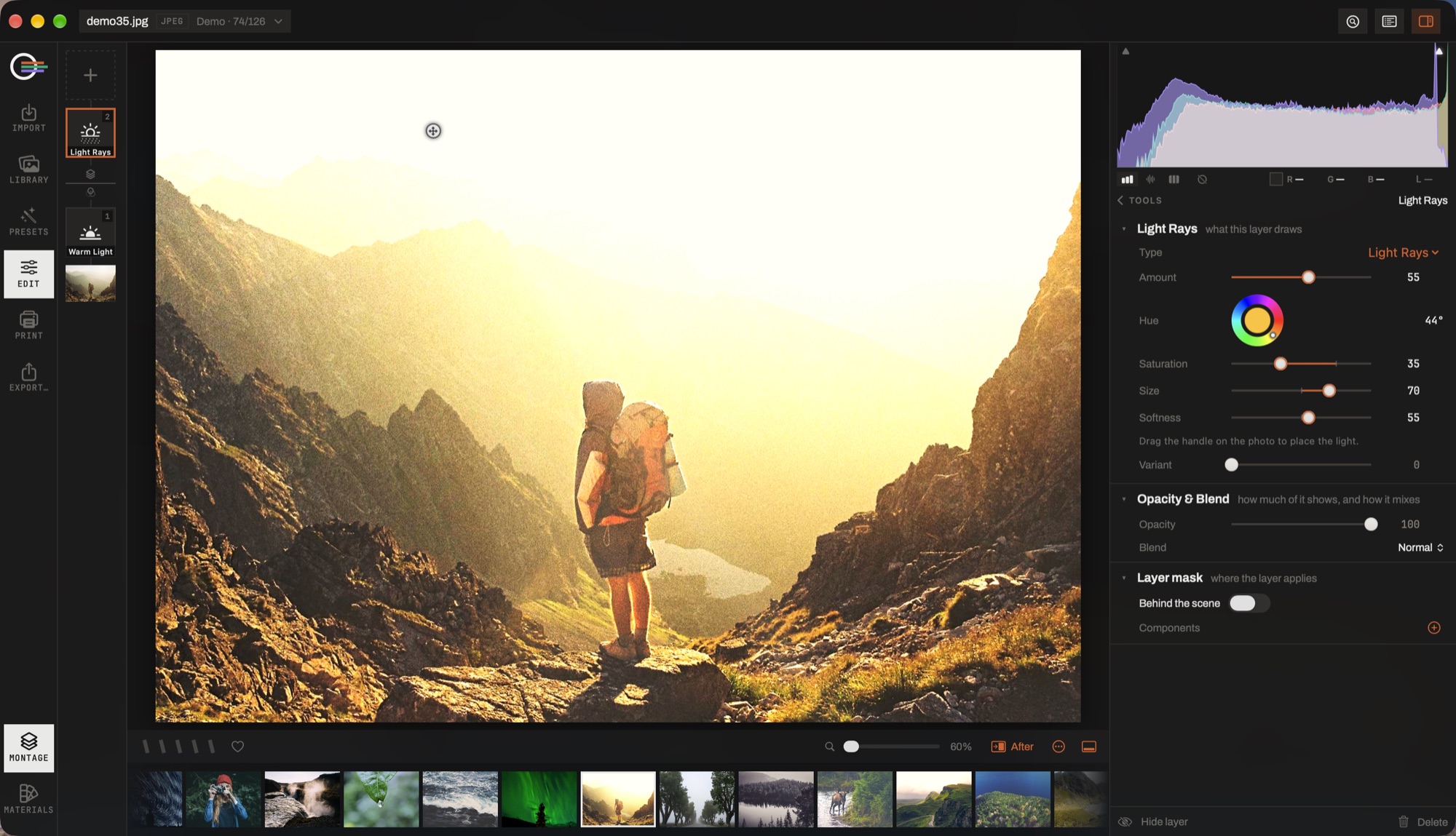
- The chain. The photograph at the bottom, everything stacked on it above, numbered in the order it is applied — first to last, which is the reverse of a list.
- The divider. Two bands, and it says which is which: overlays above, Filter Bench below. A drag never crosses it, because the two apply at different points in the render.
- A layer. Click it to open its settings, drag it onto another to reorder, ⌘-click to build a selection.
- What the layer draws. A generator has no pixels on disk — only parameters, redrawn at whatever size the render asks for, so it is as sharp in a 60 MP export as on screen.
- Opacity & Blend. Twenty-two modes in six groups, the same set for every stack in the app.
- Layer mask. The same components the Masking panel builds, so a light leak can be kept off a face.
The chain
It holds two stacks, separated by a rule because the separation is real: overlay layers composite over the finished print, filters work on the developed image before the crop. A drag never crosses between them — the alternative is a strip that silently refuses some drops.
Tap a tile and its settings take the inspector's place, handing it back when you close them. Every layer has a blend mode, an opacity and a mask of its own. Tiles reorder by dragging, and ⌘- or ⇧-click selects several at once — with more than one selected the column shows the selection: hide, delete, reorder.
The rule the whole editor is arranged by: a tool is a decision, a layer is an instance. Something you want at most once per photograph gets a panel; something you might want twice, masked or blended, gets a place in the stack.
Overlay layers
- Textures
- Thirty-odd built-in drawings — glows, bokeh, light leaks, prisms, rays, sparkle, mist and skies — plus anything you import, and any subject you have cut out of another photograph.
- Generators
- Light (leak, glow, bokeh, flare, rays), dust, paper, ink, wash, hatch and weather (rain, snow, fog, motes). They have no pixels on disk: they redraw at whatever size is asked for, so they never soften on a big export.
- Frames
- Thirteen: line, double, matte, rounded, passepartout and shadow box; and the photographic ones — 35 mm, medium format, slide, polaroid, darkroom carrier, deckle and scanner.
- Text
- A text box with any installed font.
Blend modes
Twenty-two, grouped by what they do — normal, darken, lighten, contrast, comparative, component — so that knowing one mode in a group predicts the rest. The same set serves overlay layers, filters and adjustment layers.
The four component modes have no equivalent anywhere in the sliders: colour tints without touching the tone, luminosity applies a layer's tonality and keeps the photograph's own colour.
The Filter Bench
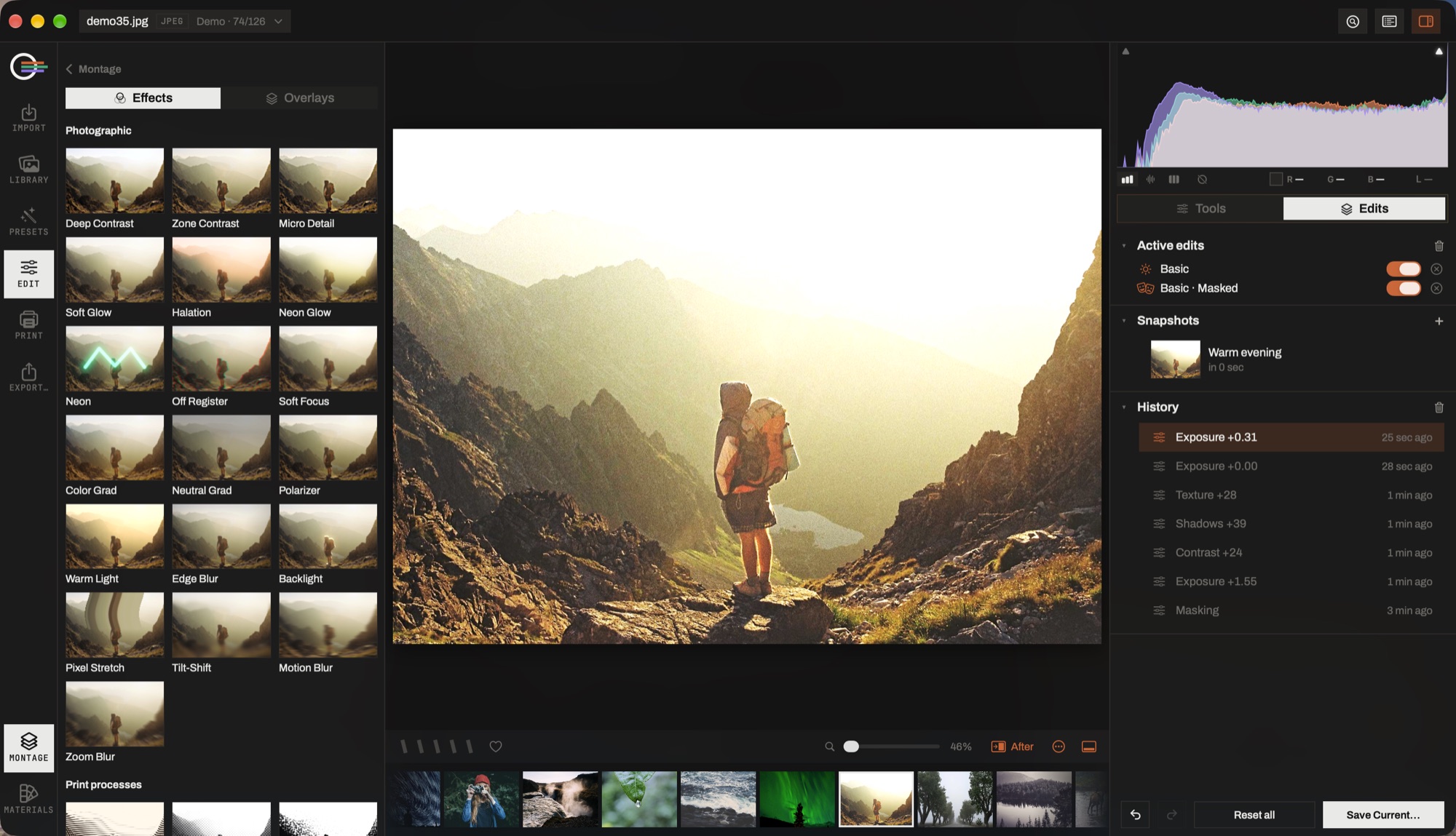
Named photographic filters, stackable and maskable, in three families.
- Photographic
- Deep Contrast · Zone Contrast · Micro Detail · Soft Glow · Halation · Neon Glow · Neon · Off Register · Soft Focus · Colour Grad · Neutral Grad · Polarizer · Warm Light · Edge Blur · Tilt-Shift · Zoom Blur · Motion Blur · Pixel Stretch · Backlight.
- Print processes
- Line Engraving · Halftone · Mezzotint · Screen Print. Not effects: each is a real way of getting a continuous-tone photograph onto paper with a substance that has one density. The screen is ruled in lines across the frame rather than in pixels, so a preview is the print at a different magnification.
- Art processes
- Pencil · Pen and Ink · Charcoal · Watercolour · Oil. Pigment on a support, with the medium's own rules — a watercolour reserves the paper for its lightest notes rather than painting them white.
Every filter carries its own mask, its own blend mode and its own opacity, which is what makes "this halation, on that window only, at 40%" a thing you can say.